
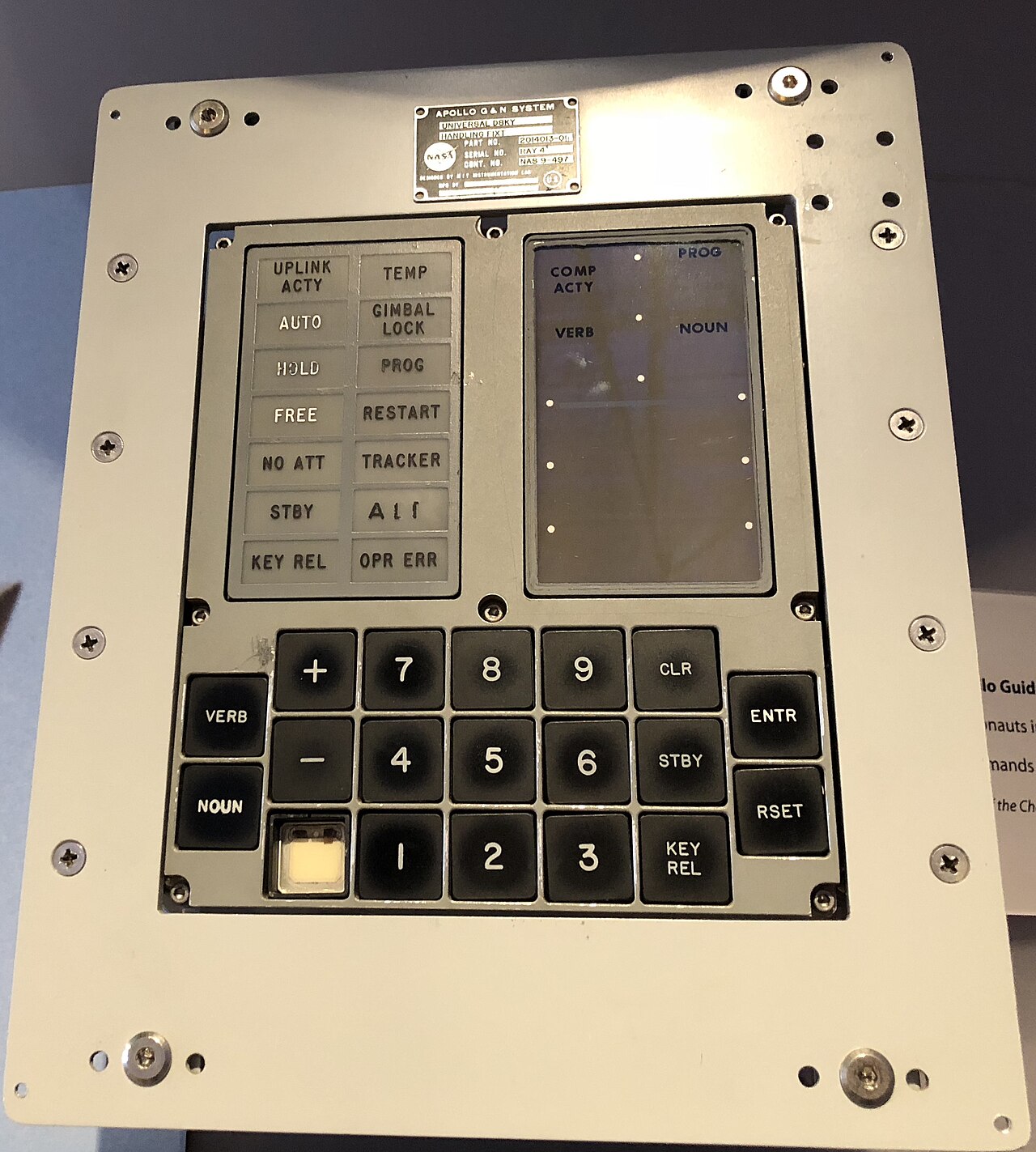
Replica Apollo Guidance Computer keypads are a well-worn genre, and most of them stop at the faceplate: a box of LEDs and switches with a script behind it. The project in Raspberry Pi Official Magazine issue 171, featured on raspberrypi.com on 22 October 2026, goes further. Recreate Apollo, built by Michael Newton, uses a Raspberry Pi running the Virtual AGC emulator to drive a 1:1-scale 3D-printed DSKY (the display and keyboard unit). It runs the actual Apollo 13 Command Module software.
Newton works as a commercial aircraft avionics engineer in Calgary, Alberta, according to the magazine. His design files and documentation are all public. The project's GitHub repository calls itself "a project and personal build journal to instruct Apollo enthusiasts on how to build their own DSKY and AGC based around Raspberry Pi, Arduino, and NASA archive drawings."
The original machine, briefly
The magazine gives the historical figures. MIT's Charles Stark Draper Laboratory introduced the AGC in 1966. It had less than 100kB of memory and a 1.024MHz clock, and the article describes it as the first computer based on silicon integrated circuits. Newton also points out that the AGC was built from only one gate type, the 3-input NOR.
The AGC was installed on board each Apollo Command Module and Lunar Module, and the DSKY is the display and keyboard used by Apollo astronauts to interact with it. That is why a replica DSKY can feel authentic: if the software behind it is the real flight code, the interaction is the real interaction.
The software: yaAGC and real flight code
The emulator comes from the Virtual AGC project. The project says its purpose is to "provide the original flight software and emulations of the onboard guidance computers flown in historical spacecraft", with the main emphasis on the Apollo Guidance Computer. Its home page lists flight software source for almost all Command Module and Lunar Module missions, along with compiler/assemblers for the source code.
The magazine explains why this matters for fidelity. Newton says yaAGC, Virtual AGC's computer program, replicates every characteristic of the real AGC, including the asynchronous timing (interrupt) behaviour behind the 1201/1202 alarm codes that he says saved Apollo 11, the 15-bit-plus-one-parity word length and the 1.024MHz clock speed. Because the timing is kept intact, the same constraints are preserved in the emulation.
Newton's build loads the Apollo 13 Command Module software. The Raspberry Pi runs the emulator, and the magazine says the Pi connects to the microcontrollers through USB. The Pi's built-in wireless LAN is used for SSH access. The repository names Arduino as the microcontroller platform. Neither source gives a specific Raspberry Pi model or microcontroller board, so we don't either.
The hardware: archive drawings, adjusted for printing
The printed parts are modelled on archived NASA drawings. Newton says the DSKY is physically about 90% authentic, and that from the outside he aimed for a perfect visual representation. The internals were changed. According to the magazine, those changes include mounting points for the microcontrollers and the Pi, a clip-style holder for the screen, and keycaps with somewhat larger lettering than the originals.
For the keys, Newton chose off-the-shelf mechanical switches with the highest actuation force and most solid click he could find, settling on Kailh Box Navy. He says they are easy to get but far from the real keypad. The sources do not say what the display panel or the annunciator lamps are made of.
Peripheral mode: a DSKY for Orbiter
The most practical feature for simulator users is what the magazine calls a "peripheral" mode, entered by long-pressing one of the keys. In this mode the DSKY works over the local network with Project Apollo - NASSP, an add-on for the Orbiter spaceflight simulator. The same unit can therefore run as a standalone AGC with the Pi doing the emulation, or as a physical keyboard and display for a simulated Command Module running on another machine. The sources do not describe the network protocol or setup steps.
Licensing, documentation and v2
The repository is under GPL-3.0. It contains a README and RecreateDSKY.pdf, along with folders for 3D printable parts, Arduino peripherals and Pi and PC software. According to the magazine, all the CAD models, schematics and a 100-page build guide are free to use and view on GitHub. When we read the repository it had been created on 23 July 2026, its last push was on 5 October 2026, and it had 30 stars. It points to a project site at www.recreateapollo.com.
The repository credits PCBWay as a sponsor, "who have made the upcoming v2 possible." The magazine says Newton is looking to create a much more premium DSKY with a full aluminium body, better annunciators, and maybe a real electroluminescent display. No release date or price for v2 appears in either source.
What It Means for Makers
Who it is for: spaceflight enthusiasts, Orbiter/NASSP users who want physical controls, and educators who want to show how a 1960s flight computer behaved. The build covers 3D printing, microcontroller wiring and firmware, a Raspberry Pi running Raspberry Pi OS and keyswitch wiring. It is a substantial project, not a weekend kit, although Newton says he wrote the guide so that anyone interested, even with no prior knowledge, could build one.
What it replaces or enables: it replaces display-only props and screen-based DSKY emulators with a full-size physical unit running real flight code through yaAGC. Peripheral mode also makes it a hardware front end for NASSP. Builders who have used Virtual AGC on a desktop get an enclosure design, schematics and a build guide, so they don't have to design their own.
Price and availability: as of 22 October 2026, the v1 design files (CAD models, schematics and the build guide) are free on GitHub under GPL-3.0. Neither source describes a kit, an assembled unit or any price, so builders source and print their own parts. Parts cost is not stated. v2 is planned, with no date or price given.
On safety: the magazine says the Pi needs little power and connects to the microcontrollers over USB. As with any Raspberry Pi project, use a proper commercial power supply rather than improvised wiring.
