
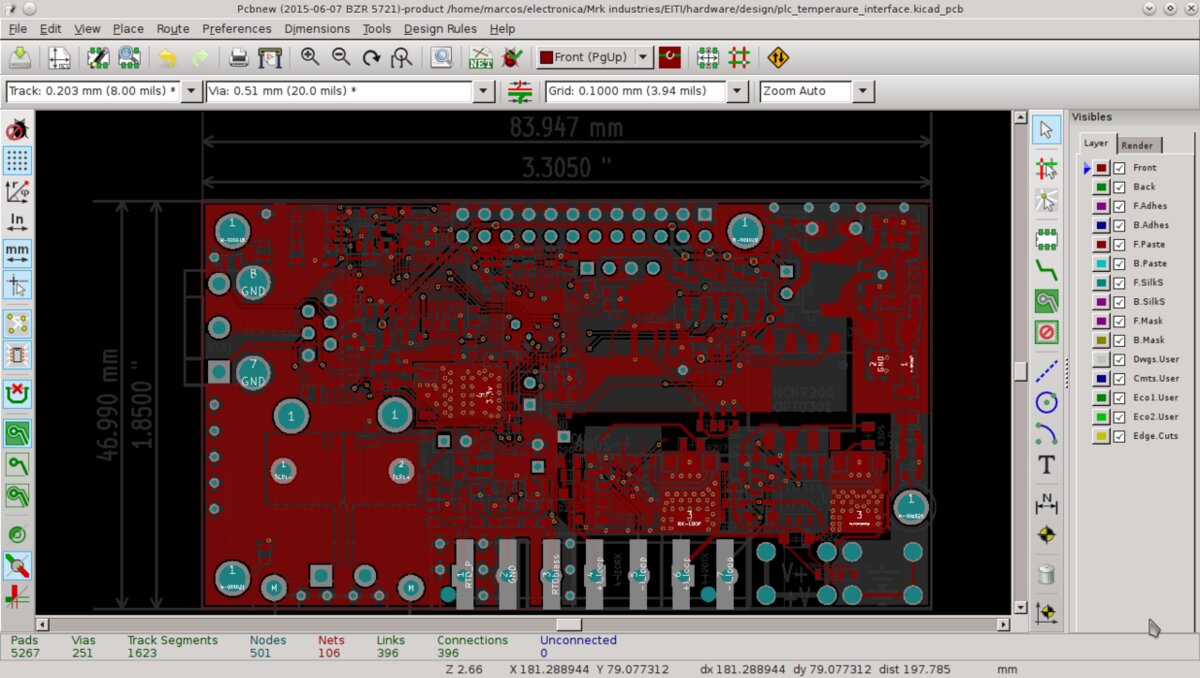
Most browser-based PCB tools ask you to give up something: your file format, your library, or your ability to leave. ZiroEDA Designer takes a different route. Instead of building a new EDA suite that imports KiCad files, independent developer Akshay Rukade has ported KiCad itself. The project's GitHub README calls it an "open-source, browser-native port of KiCad 10." It is licensed under GPL-3.0-or-later, and according to the README it reads and writes KiCad's native files directly, with no import step.
Hackaday covered the project on 22 October 2026. It described ZiroEDA as a TypeScript port of KiCad 10.0.6's C++ source that brings the schematic editor, PCB editor, interactive router, and the electrical and design rule checkers into a browser. The most recent tagged release in the project's changelog is v0.9.0, dated 20 October 2026.
What exactly was ported
The claim that matters is fidelity, and the repository is specific about it. According to the README, the codebase is mirrored file for file against the KiCad 10.0.6 tag, so behaviour can be checked against the original line by line. This is a structural translation of the upstream C++ into TypeScript, not a fresh reimplementation. For anyone who has watched third-party tools mangle a KiCad project, that structure is the main reason to take the project seriously.
The browser-side stack, as listed in the README:
- 2D rendering: WebGL
- 3D viewer: three.js
- UI: React
- Auth, cloud storage and realtime: Supabase
- Testing: Vitest, with more than 1,500 test files
Both the README and Hackaday say KiCad's own kicad-cli is used for compatibility testing, comparing ZiroEDA's output with upstream KiCad's. Hackaday also reports, citing the developer, that zone fills came out vertex-identical to KiCad's. Zone filling is one of the more involved geometric operations in a PCB tool, and pours that differ slightly between tools can surface as DRC disagreements later. That result comes from the developer's own testing, not from an independent benchmark.
What v0.9.0 adds
The changelog entry for v0.9.0 (2026-10-20) lists these headline additions:
- Read-only GitHub viewing. Any public GitHub KiCad project can be opened at
designer.ziroeda.com/gh/<owner>/<repo>, read-only, with a "Save a copy" option to make it yours. Swap a repository path into that URL and the board opens in the browser with nothing installed. - Fabrication output. Gerber and PDF output through KiCad's own plotters, so the files come out the way KiCad writes them.
- Full ERC tester. Electrical Rules Check now runs KiCad's full ERC tester, including library, footprint-link, text-variable and simulation-model checks.
- Background zone fills. Zone fills run in the background and the board can draw in a background worker, so a large board no longer freezes the window.
The GitHub viewer may end up being the most-used feature. Open-hardware repositories often ship KiCad sources that only someone with KiCad installed can inspect. A shareable URL that renders the actual design read-only is useful for code review, for issue threads, and for anyone deciding whether to clone a project.
The encryption model
Hackaday says projects are end-to-end encrypted. The README gives the details. Cloud projects are encrypted in the browser before upload, and every project has its own random key. File contents, file names and project metadata are encrypted with AES-256-GCM. The project key is wrapped under the user's account key, and that account key is wrapped twice: once by a key derived from the password with Argon2id, and once by a recovery key shown once at sign-up. Sharing a project seals only its key to the collaborator's public key using ECDH on the P-256 curve. Because encryption happens client-side, the README is explicit about the trade-off: if you lose both your password and your recovery key, your encrypted projects cannot be recovered by anyone.
That is the expected behaviour of a properly end-to-end design, and it is the opposite of the "forgot password" flow most cloud tools offer. Anyone putting real work into the hosted version should store the recovery key somewhere other than the browser, and should keep local copies of the KiCad files. The native file format makes that easy.
What it is not
The README states that ZiroEDA is not affiliated with or endorsed by the KiCad project. It also says the tool extends the KiCad ecosystem rather than replacing KiCad, and that desktop KiCad remains the right choice for very large, heavy designs. That frank framing fits a project that is, by Hackaday's account and the README's own, still a work in progress, with some dialogs not yet implemented.
Versioning is also worth noting. ZiroEDA tracks the KiCad 10.0.6 tag. The KiCad project's blog shows 10.0.7 stable released on 7 October 2026 and 10.0.8 Release Candidate 1 published on 22 October 2026, the same day as the Hackaday piece. So the port is currently one stable point release behind upstream, with another on the way. The KiCad blog describes 10.0.7 as a bug fix release, so anyone relying on a specific fix from it should not assume ZiroEDA has it. Whether and how quickly the port follows upstream point releases is the main open question for its long-term usefulness. Mirroring file for file against a tag should make tracking upstream more mechanical than it would be for a looser reimplementation.
Pace of development
The project is young and moving fast. GitHub shows the repository was created on 26 June 2026, and it had more than 3,800 commits when we checked. The changelog cites 3,700+ commits since 29 June 2026. That is roughly four months from first commit to a v0.9.0 with schematic capture, layout, routing, ERC, DRC and Gerber output. The repository had 41 stars when checked, so it is early.
What It Means for Makers
Who it is for: KiCad users who want to view or make quick edits to a design on a machine without KiCad installed, such as a school lab computer, a locked-down work laptop or a borrowed machine. The README names students and labs, teams and reviewers, and people browsing open hardware as the intended audience.
What it replaces or enables: Per its own README, it does not replace desktop KiCad. It adds a browser front end to the same file format, and the developer says large designs belong on the desktop. Because it reads and writes native KiCad files, moving a project between ZiroEDA and desktop KiCad requires no conversion step. That is the main difference from browser EDA tools with their own proprietary formats. The read-only GitHub viewer and in-browser Gerber/PDF output are the features most likely to be useful straight away.
Price and availability: The source code is on GitHub under GPL-3.0-or-later (GitHub lists it as GPL-3.0), and the hosted designer runs at designer.ziroeda.com. The sources we reviewed do not list a price for the hosted service or its cloud storage. Status: beta. v0.9.0 was released on 20 October 2026, some dialogs are still missing, and the port is based on KiCad 10.0.6 rather than the current 10.0.7 stable. Treat it as a capable preview, keep your files backed up locally, and keep your recovery key safe.
