
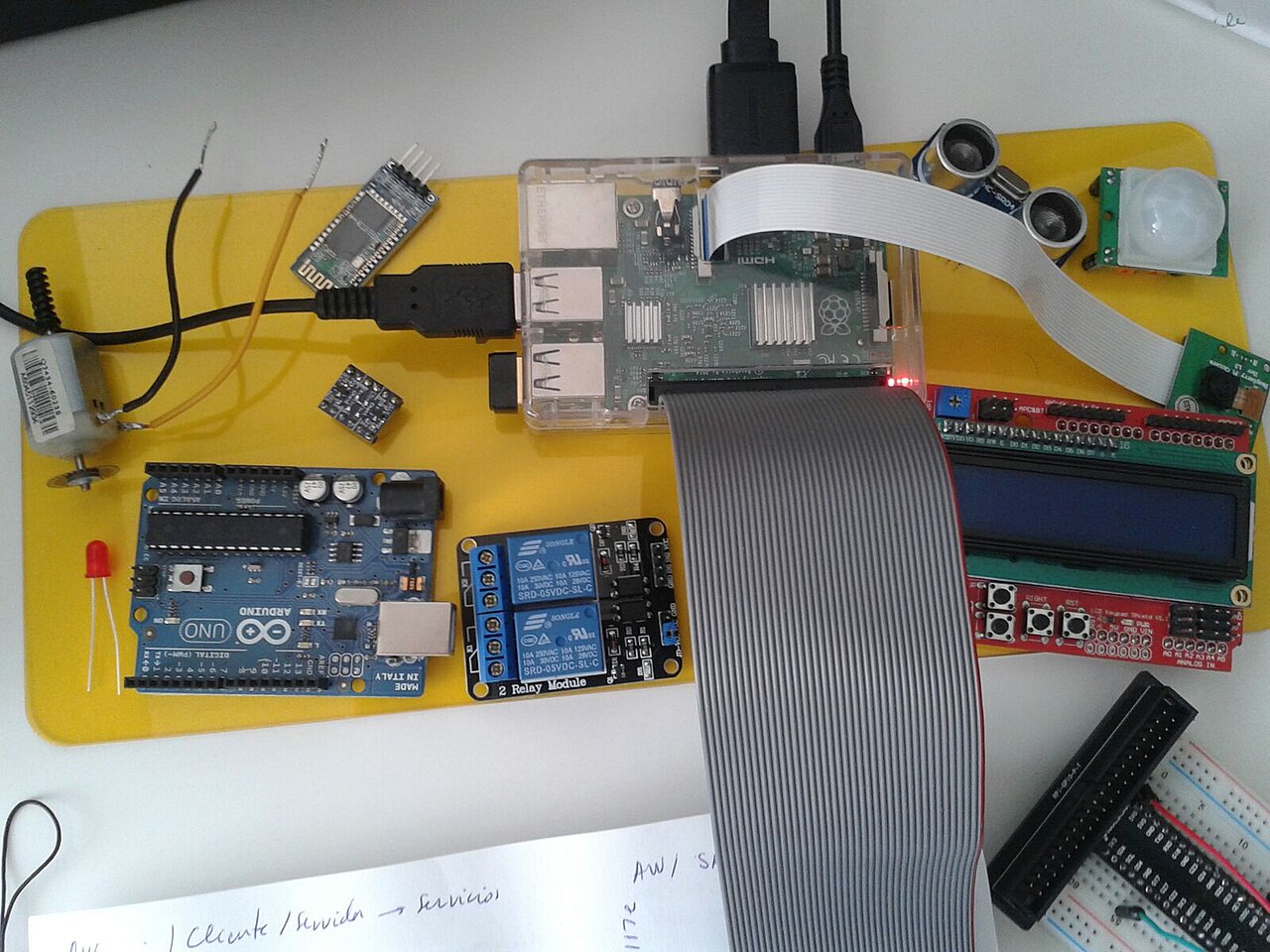
"Arduino, ESP32 or Raspberry Pi?" is the first question in most maker projects, and the usual answers ("Arduino for beginners, Pi for anything serious") skip the parts that actually decide it. These three families are different classes of device. An Arduino Uno is a microcontroller board that runs one program directly on the chip. An ESP32 board is also a microcontroller, but one with Wi-Fi and Bluetooth built in and a lot more memory. A Raspberry Pi 5 is a full Linux computer with a quad-core 64-bit CPU and gigabytes of RAM. This guide compares representative boards using the makers' own documentation (as of October 2026) and then sorts projects by which kind of hardware they need.
The boards side by side
Four boards stand in for their families here: the Arduino UNO R3 (the classic 8-bit board), the UNO R4 Minima (its 32-bit successor in the same form factor), the Arduino Nano ESP32 (an ESP32-S3 board with official Arduino support) and the Raspberry Pi 5.
| Arduino UNO R3 | Arduino UNO R4 Minima | Arduino Nano ESP32 | Raspberry Pi 5 | |
|---|---|---|---|---|
| Processor | ATmega328P, 16 MHz | Renesas RA4M1 (Arm Cortex-M4), 48 MHz | ESP32-S3 (in a u-blox NORA-W106-10B module), up to 240 MHz | Broadcom BCM2712, quad-core Arm Cortex-A76, 2.4 GHz |
| Memory | 32 KB flash, 2 KB SRAM, 1 KB EEPROM | 256 kB flash, 32 kB SRAM, 8 kB data memory (EEPROM) | 512 kB SRAM, 8 MB PSRAM, 16 MB external flash | 1, 2, 4, 8 or 16 GB LPDDR4X |
| I/O voltage | 5 V | 5 V | 3.3 V | 3.3 V |
| Current per I/O pin (maker figure) | 20 mA | 8 mA | 40 mA source, 28 mA sink (Espressif: typical values at maximum drive, not a rated limit) | Drive strength selectable at 2, 4, 8 or 12 mA (RP1 datasheet); 50 mA combined for all GPIO (general Raspberry Pi figure) |
| I/O | 14 digital (6 PWM), 6 analog in | 14 digital, 6 analog in, 1 DAC, CAN (external transceiver needed) | 14 digital, 8 analog in | 40-pin GPIO header; USB 3.0 and 2.0, Gigabit Ethernet, two micro-HDMI, two 4-lane MIPI camera/display ports, PCIe 2.0 x1 |
| Wireless | None | None | Wi-Fi 4 (802.11b/g/n) 2.4 GHz, Bluetooth 5.0 LE | Dual-band 802.11ac Wi-Fi, Bluetooth 5.0 and BLE |
| Power input | 7-12 V nominal (barrel jack), or USB | 6-24 V (VIN), or 5 V USB-C | 6-21 V nominal, or 5 V USB-C | 5.1 V USB-C; 5 A supply recommended |
Figures come from Arduino's tech-spec pages for each board and from Raspberry Pi's documentation. The Raspberry Pi 5 drive-strength settings come from the datasheet for RP1, the Pi 5's I/O controller; the 50 mA combined figure comes from a general table of typical current draws in Raspberry Pi's documentation rather than a Pi 5-specific specification. Drive strength is the current at which a pin is guaranteed to hold a valid logic level, not a current limit.
Arduino: one program, real-time and 5 V tolerant
The appeal of a classic Arduino is that nothing else runs on it. Your sketch is the only code on the ATmega328P, so a pin toggles when your code says so, with no operating system in the way. Arduino's documentation lists the UNO R3 at 16 MHz with 32 KB of flash and 2 KB of SRAM, which is enough for reading sensors, driving servos and running a state machine, and very little else. Arduino also points out that the R3's ATmega328P sits in a socket, so a chip you've damaged can be replaced for a few dollars.
The other reason to choose one is voltage. The UNO R3 and R4 both run 5 V logic, so a large back catalogue of 5 V shields and modules connects without level shifting. Arduino's UNO R4 Minima documentation says shields designed for earlier UNO revisions "are therefore safe to use" with it, while adding that they "are not guaranteed to be software compatible."
The R4 Minima moves the UNO to a 48 MHz Cortex-M4 with 256 kB of flash and 32 kB of SRAM, adds a DAC and a CAN controller, and accepts 6 to 24 V on VIN. One trade-off is easy to miss: Arduino rates its I/O pins at 8 mA, against 20 mA on the R3. Old sketches that drove an LED straight from a pin at R3 currents need a larger resistor or a transistor on the R4. If you want the UNO form factor with wireless, the UNO R4 WiFi pairs the same RA4M1 with an ESP32-S3-MINI-1-N8 module; Arduino notes that its ESP32-S3 side runs at 3.3 V while the board's circuits run at 5 V. Arduino's range also now includes the Linux-capable UNO Q, which PinoutFeed reported had shipped more than 270,000 boards in its first year, but it is a different class of board from the microcontroller UNOs compared here.
ESP32: a microcontroller with a radio and room to grow
An ESP32 board covers the large middle ground of connected projects: weather stations that post to a server, Home Assistant sensors, BLE remotes and small web dashboards. You still get bare-metal or RTOS control of the pins, plus Wi-Fi and Bluetooth on the same chip. Arduino's Nano ESP32 page lists 512 kB of SRAM, 8 MB of PSRAM and 16 MB of flash, which is orders of magnitude more memory than an UNO R3.
The main thing to adjust to is 3.3 V logic. Espressif's ESP32-S3 datasheet recommends a 3.0 to 3.6 V supply and puts the maximum high-level input at VDD + 0.3 V, so 5 V signals need level shifting. Arduino lists the Nano ESP32 pins at 40 mA source and 28 mA sink. Espressif's ESP32-S3 datasheet gives the same numbers as typical values at the strongest drive setting, with no maximum rating, so don't design a load around them.
The family has also split. The original ESP32 (single- or dual-core Xtensa LX6 at up to 240 MHz, 520 KB SRAM) lists Bluetooth Classic (BR/EDR) alongside Bluetooth LE in its datasheet, while the ESP32-S3 datasheet lists Bluetooth LE only. That matters for some audio and serial-over-Bluetooth projects. Newer chips add Wi-Fi 6, Thread and Zigbee, or drop the radio entirely, so check which variant a board carries before assuming it can do what an older ESP32 tutorial shows.
Raspberry Pi: when the project is really a computer
A Raspberry Pi 5 is a different tool. Raspberry Pi's documentation describes a Broadcom BCM2712 with four 64-bit Arm Cortex-A76 cores at 2.4 GHz, LPDDR4X memory in fixed options from 1 GB to 16 GB, dual-band 802.11ac Wi-Fi, Bluetooth 5.0, Gigabit Ethernet, two USB 3.0 ports and two micro-HDMI outputs for up to two 4K displays at 60 Hz. It runs a full Linux distribution, so the project can use Python libraries, a database, a web server, a camera pipeline, a desktop or a local machine-learning model, all on one board.
That capability costs power and adds overhead. Raspberry Pi recommends a 5 A supply for the Pi 5 and lists its typical bare-board active draw at 800 mA. The OS also sits between your code and the pins, which matters for jobs that need precise timing. Its GPIO header is 3.3 V, and the documentation is explicit: "Do not use 5V for 3.3V components" and do not connect motors directly to GPIO pins. The same documentation's table of typical current draws lists the GPIO pins at 50 mA maximum combined, so the header is for signals, not for powering loads.
Many good projects use both kinds of device: a Pi handles the network, storage and interface, while a microcontroller over USB or UART handles the timing-critical I/O.
What It Means for Makers
Start with what the project has to do, not with the board you already own:
- Read sensors and drive outputs with tight timing, on 5 V parts, no network: an Arduino UNO. Pick the R3 for maximum compatibility with old tutorials and per-pin current, or the R4 Minima for more memory, a DAC and CAN.
- Sensor or controller that reports over Wi-Fi or Bluetooth, possibly on batteries: an ESP32 board. Plan for 3.3 V logic from the start.
- Anything that needs Linux, a screen or desktop, a camera pipeline, storage, a database or heavy compute: a Raspberry Pi, with a supply sized for it.
- Linux plus hard real-time I/O: a Pi and a microcontroller together, rather than forcing one to do both jobs.
Specifications change with board revisions and pricing changes often, so check the maker's current documentation before buying. The figures here are as published by Arduino, Espressif and Raspberry Pi in October 2026.
Sources
- Arduino UNO R3: product documentation and tech specs (Arduino)
- Arduino UNO R4 Minima: product documentation and tech specs (Arduino)
- Arduino UNO R4 WiFi: product documentation and tech specs (Arduino)
- Arduino Nano ESP32: product documentation and tech specs (Arduino)
- ESP32 Series Datasheet v5.3 (Espressif)
- ESP32-S3 Series Datasheet v2.2 (Espressif)
- Raspberry Pi 5 components and ports, documentation source (raspberrypi/documentation on GitHub)
- Raspberry Pi power supply requirements, documentation source (raspberrypi/documentation on GitHub)
- Raspberry Pi hardware documentation: GPIO and power (Raspberry Pi)
- RP1 Peripherals datasheet: GPIO pads (Raspberry Pi)
