
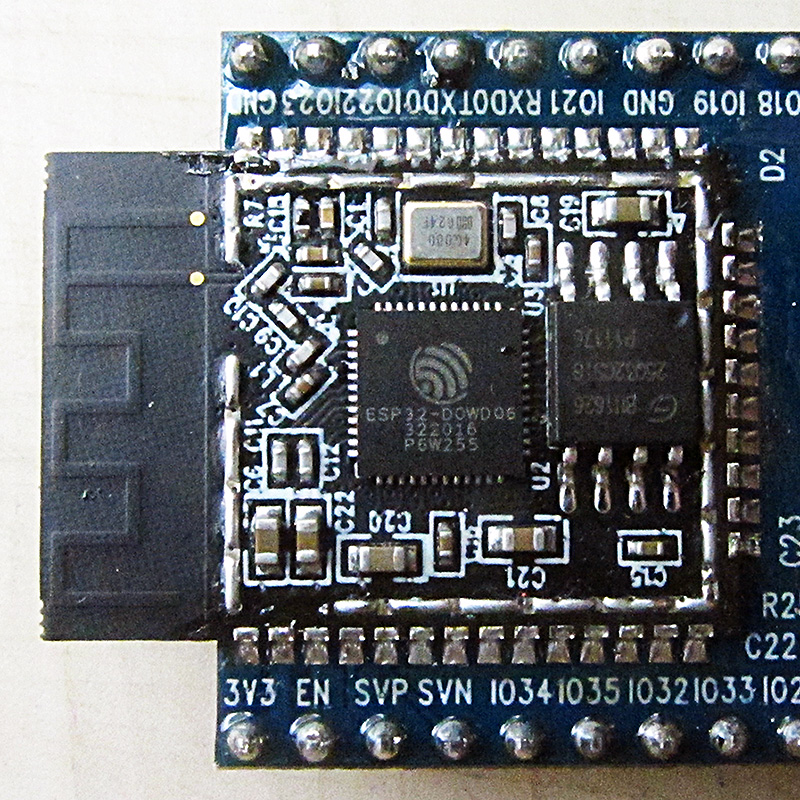
Password managers stop working wherever there is no browser extension to fill the field. That covers a firmware setup screen, a machine kept off the network on purpose, and a shared lab PC you would rather not install anything on. ToothPaste, an open-source project by the developer who publishes as brisk4t, deals with those cases the old way. It pretends to be a keyboard. Hackaday covered the project on 3 November 2026. The creator's own write-up is dated 20 August 2026, and the GitHub repository lists a v2.0.0 release dated 2026-06-01, so the hardware is not new this week. It is getting a wider audience now.
The basic idea
As Hackaday describes it, an ESP32-S3 plugs into the target computer and acts as a keyboard and mouse. A laptop or phone connects to the ESP32 over an encrypted Web Bluetooth (Web-BLE) link. That second device sends text to the ESP32 using an extension for Chromium-based browsers, and the ESP32 types it out over USB. To the target, the device is ordinary human-interface hardware, so it needs no app or driver. That is the whole reason it works in a BIOS menu or on a locked-down machine.
The GitHub repository describes the project more broadly, as "Secure Wireless Data-Transfer over BLE and USB for Passwords, Pentesting and Media Control". The creator's blog also points to a separate ToothPasteDesktop project, a Rust-based terminal interface and MCP server. The repository is licensed under AGPL-3.0.
Hackaday notes that the trick itself is familiar: a similar technique has been pulled off with an ATtiny85. ToothPaste is different because of how much of its design goes into protecting the link between the browser and the dongle.
V1 to V2: moving the key off the flash
The creator's blog post calls V2 a "Hardware-Backed BLE Clipboard". It transmits AES-256-encrypted keyboard and mouse commands over Web-BLE and pairs an ESP32-S3 with a cryptographic IC. The post's comparison table shows how the two generations differ:
- V1: MbedTLS security stack, with software-bound credential storage.
- V2: MbedTLS plus Microchip's Cryptoauthlib, with hardware-bound credential storage. A Microchip ATECC608B secure element generates and stores the private key. Per the write-up, the only information sent over the I2C bus is the session-specific AES-256 key.
In practice, the ECDH private key is never exposed to the ESP32's flash memory, where a firmware dump could recover it. Someone who steals the dongle and reads the microcontroller's storage should find no reusable identity key. A session key is still exposed on the I2C lines during use, though, and the author does not claim otherwise. The author also cautions that anyone who can dump the browser's IndexedDB data can reach the stored AES key and impersonate the sending device.
In a comment under the Hackaday article, the author adds that each packet is signed with AES-256-GCM, that the ECDH keys are on a secure element on the hardware side, and that on the Web-BLE transmitter side they are locked with a password. Strictly, GCM is authenticated encryption: it provides confidentiality and integrity under a shared key rather than a public-key signature. The effect is similar in the sense that tampered or forged packets should fail authentication.
Why the project rolls its own pairing
The design follows from a limit of the browser platform. The blog says Web BLE only supports the "just works" authentication method, which it calls "practically an open line", and it names man-in-the-middle attacks as a real problem for a device that types passwords. ToothPaste therefore does not rely on Bluetooth link-layer security. The blog describes a two-step workflow combining ECDH public-key cryptography with a "partially Out of Band" key exchange, meaning the keys are not shared over BLE, to derive the symmetric AES-256 key that encrypts the packets. Readers who want the exact details of that exchange should read the repository rather than rely on a summary. The write-up gives the outline, not a formal protocol specification.
Hardware, as documented
The sources give little hard hardware spec, and PinoutFeed is not going to fill the gaps. Here is what the creator's pages state:
- MCU: ESP32-S3, which provides USB and BLE in one package (Hackaday, blog). The blog also refers to the ESP32-WROOM module when describing the V2 board. Check the repository's hardware files for the exact module variant before ordering parts.
- Secure element: Microchip ATECC608B on I2C (blog).
- User input: the firmware's "button" is GPIO0, often labeled BOOT on ESP32 dev boards (blog).
- Boards: PCBWay sponsored the prototype V2 PCBs and assembled them, and the author also ordered a USB-A version (blog).
The sources give no clock speeds, memory figures, power draw or enclosure dimensions for the ToothPaste board, so this article does not quote any.
Getting firmware onto it
The blog's quick start gives two routes. You can flash the firmware straight from the ToothPaste web app, which uses a Web Serial selector and so needs a Chromium-based browser such as Brave, Edge or Chrome. Or you can download a prebuilt .bin from the releases section and flash it with esptool, espwebtool or a similar utility. Building from source needs ESP-IDF 5.5.1 or newer to build the firmware folder, plus Protoc, NanoPB and ProtoBuf JS if you change the ProtoBuf packets. The repository README repeats the ESP-IDF requirement. The Protocol Buffers toolchain suggests the browser and the firmware exchange structured, schema-defined messages rather than raw keystroke strings.
The GitHub releases API lists three tagged releases: firmware (2026-02-16), v1.1.0 (2026-06-01) and v2.0.0 (2026-06-01). The last push to the repository was 2026-09-30. The blog page showed 193 GitHub stars when it was captured, and the repository page showed 198.
The objection in the comments
Hackaday's commenters raised the obvious problem. If the target machine is untrusted, a keylogger on it could record whatever ToothPaste types. Encryption over the air protects the trip from phone to dongle. It cannot protect the secret once it arrives as plaintext keystrokes on a compromised host, because a USB keyboard has no way to know who is listening. One commenter countered that a keylogger would capture only one password rather than a whole password database, which is the exposure of installing a manager's extension on an untrusted PC. ToothPaste is safer than typing a long password by hand while someone watches. It is not a defence against a compromised endpoint, and no keystroke injector could be. For BIOS passwords and air-gapped machines you control, that threat model is reasonable. For a public kiosk, the risk the commenters describe still applies.
The setup also depends on Chromium, for both Web Bluetooth and the Web Serial flasher. The blog says the web app does not work in non-Chromium browsers such as Firefox, and suggests the desktop app for people who prefer them.
What It Means for Makers
Who it is for: sysadmins and homelab owners who keep typing long credentials into firmware screens, KVM-less servers or air-gapped boxes. Penetration testers, whom the repository's description names directly. And anyone who wants a worked, readable example of pairing an ESP32-S3 with an ATECC608B through Cryptoauthlib. That last use may outlast the gadget: the blog's V1-to-V2 comparison is a short case study in moving credentials from firmware into a secure element.
What it replaces: typing secrets by hand, and the cheaper ATtiny85 keystroke tricks Hackaday mentions. The blog itself notes the USB Rubber Ducky used the same keyboard-emulation idea, and ToothPaste also supports Duckyscript scripts.
Price and availability: none of the sources gives a price or a commercial product. ToothPaste is an open-source project under AGPL-3.0, with firmware, source and releases on GitHub. The only boards mentioned are PCBWay-sponsored prototypes. Anyone who wants one today should expect to build or order their own board from the project files; the blog says that for most hobbyists any development board will suffice, though V2's hardware-backed key storage needs the ATECC608B. Note the AGPL terms if you plan to redistribute modified firmware or host the web app.
Caveat: the project's ECDH and out-of-band pairing exist because Web-BLE "just works" pairing offers no man-in-the-middle protection. It is a sensible design, but it is the developer's own, and the sources reviewed here mention no independent audit. The author describes the project as a work in progress.
